This little example was motivated by trying to get OpenClaw to reliably message and respond to messages in Google Chat. Getting all the moving pieces setup in a reliable way is harder than it should be, and OpenClaw + gog is really geared towards a personal use case. Google has Developer Preview stuff that may make this easier, but they’re not generally available. Simpler approaches ran into issues with stale subscriptions, gRPC silent timeouts, and other reliablity issues.
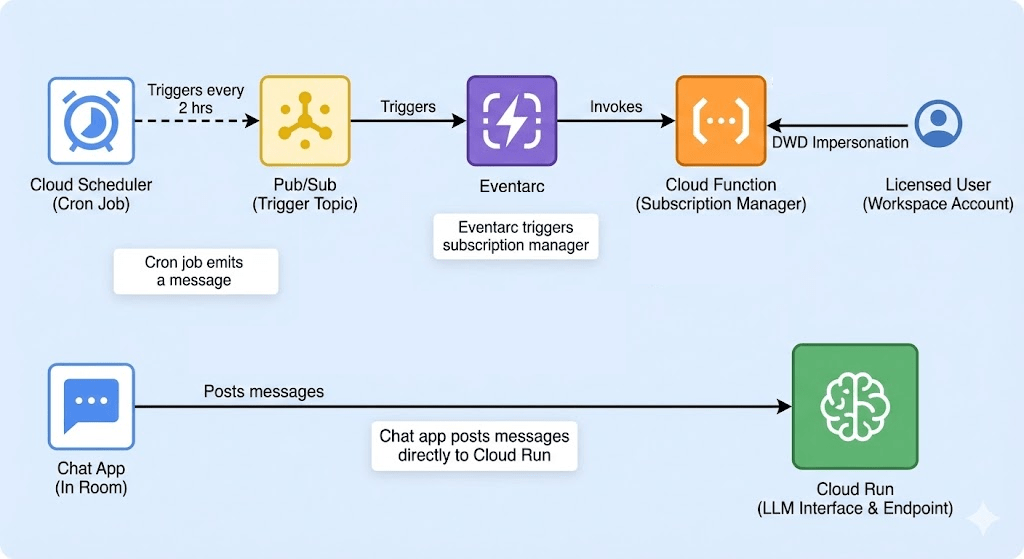
Here is the architecture for a reliable, general-purpose AI integration that actually hears what’s happening in the room. Once you add the app and user to the space, they can interact like a normal user in that room. Most of the reliability issues are transferred from your own code and setup to Google’s infrastructure.
This approach can be used for OpenClaw, or to setup a Vertex AI agent in Google Chat, or others.
GitHub: https://github.com/RayneDance/workspace-ai-messaging
The Architecture
To build a general-purpose AI integration that “hears” everything in a room, you need the following stack:
- A Chat App added to any spaces that need a listener.
- Cloud Run: Hosts your LLM interface and the endpoint to receive events via Eventarc.
- Service Account: Acts as the identity for backend authentication.
- Licensed User: A Workspace account used for Domain-Wide Delegation (DWD) impersonation.
- Cloud Scheduler: A cron job that triggers the renewal process.
- Pub/Sub: Used strictly as a trigger for the Subscription Manager function.
- Cloud Function: The “Subscription Manager” that renews the Workspace event subscription every 2 hours.
The “Big Catch” with Google Chat
By default, Google Chat apps are “deaf.” They only receive events if they are directly messaged or explicitly @tagged. To build a personified AI that acts as a general participant, you must:
- Subscribe to Workspace events via the Events API.
- Impersonate a licensed user via DWD during that subscription process.
The Refresh Loop
Workspace subscriptions expire every 4 hours. If you don’t refresh, your AI goes deaf. I recommend a refresh every 2 hours to ensure zero downtime.
The Setup
1. Project Setup & Identity
I strongly recommend isolating this integration within its own dedicated Google Cloud project.
- Create a new Google Cloud project.
- Service Account: Navigate to IAM & Admin > Service Accounts. Create one and record its Unique ID (Client ID) for the DWD step. The Unique ID is a string of numbers only. It is not the email address of the service account.
- Keys: Create a JSON key for this SA, download it, and upload the content to Secret Manager.
- APIs: Enable the heavy hitters:
gcloud services enable \ iam.googleapis.com pubsub.googleapis.com eventarc.googleapis.com \ run.googleapis.com cloudfunctions.googleapis.com \ chat.googleapis.com workspaceevents.googleapis.com
2. The “App” & OAuth Configuration
Google Chat won’t talk to your project unless it’s configured as a Chat App.
- OAuth Consent Screen: Go to APIs & Services > OAuth consent screen.
- Select Internal (since this is for your Workspace).
- Fill in the app name and support email. You’ll add the same scopes here in the DWD step.
https://www.googleapis.com/auth/chat.spaces, https://www.googleapis.com/auth/chat.messages, https://www.googleapis.com/auth/chat.memberships, https://www.googleapis.com/auth/workspace.events.subscription.readonly
- Google Chat API: Go to the Google Chat API page in the console and click Configuration.
- App Status: Set to “Live.”
- Interactive Features: Enable this if you want to receive any UI events.
- Connection Settings: Select Pub/Sub and point it to the
chat-eventstopic we will create in Step 5.
3. Domain-Wide Delegation (DWD)
This grants your Service Account the “keys to the kingdom” to act as a user.
- Open the Google Admin Console and go to Security > Access & Data Controls > API Controls.
- Click Manage Domain Wide Delegation > Add New.
- Client ID: Paste the Unique ID from your Service Account.
- OAuth Scopes: Paste this exact string:
https://www.googleapis.com/auth/chat.spaces, https://www.googleapis.com/auth/chat.messages, https://www.googleapis.com/auth/chat.memberships, https://www.googleapis.com/auth/workspace.events.subscription.readonly
4. Permissions (The “Least Privilege” Way)
Your Service Account needs specific roles. Use this gcloud logic:
roles/iam.serviceAccountTokenCreator: To generate DWD tokens.roles/pubsub.publisher: To route events.roles/run.invoker: To let Eventarc/Pub/Sub hit your Cloud Run endpoint.
I may have missed a role or two here. You’ll know pretty quickly when you get permission errors.
5. The Plumbing (Pub/Sub & Scheduler)
- Pub/Sub Topics: Create
subscription-messageso our subscription manager can trigger itself. - Cloud Scheduler: Create a job with the cron
0 */2 * * *. Target Pub/Sub and select thesubscription-messagetopic.
6. The Subscription Manager (Cloud Function)
Create a Python Cloud Function triggered by the subscription-message topic.
Critical implementation detail: You must execute
creds.refresh(auth_request)to get a fresh token before calling the Workspace Events API. Without this, the API will reject your credentials even if the JSON key is valid.
7. The AI App (Cloud Run)
Finally, deploy your Flask/FastAPI app to Cloud Run. It should:
- Verify the push to /googlechat is legitimate.
- Parse the Chat event. (This is a big problem, see below)
- Use the same DWD impersonation logic to post a reply back to the Space using the
chat.messages.createmethod.
See example_app.py for a minimal, insecure example.
Extending This Example
One of the easiest ways to extend this example is to simply ingest messages via your Could Run app, filter them to what you need, and push that out to a new topic. From there, multiple AI agents can easily subscribe to the Pub/Sub topic, or you can fire events on push to that topic.
Why This Approach?
This approach is somewhat complex, but it has proven to be extremely reliable for me. Many of the issues I had with less drastic implementations are simply gone. This takes many of the messaging and reliability problems and makes them Google’s problem to solve.
A Note on Chat Event Parsing
One of the biggest hurdles is schema inconsistency. Events arriving via the Workspace Events API often have a different envelope than standard Chat App webhooks. I haven’t figured out the when or why on which schema will arrive https://developers.google.com/workspace/chat/api/reference/rest/v1/Event
Pro Tip: If you have the headroom, pass the raw JSON to your LLM and ask it to extract the sender_id, text, and thread_id. It is often more reliable than writing a brittle parser for fluctuating schemas.
 Freedom's Ramblings
Leave a comment